device-docs
Remove an Ingredient from a Recipe
This page shows you how to take an ingredient out of a recipe.
Step 1: Open the Recipe
- Tap the menu icon (three lines) in the top-left corner.
- Tap Settings.
- Tap Products.
- Tap the recipe you want to change.
The Recipe Editor will open and show the current ingredients.
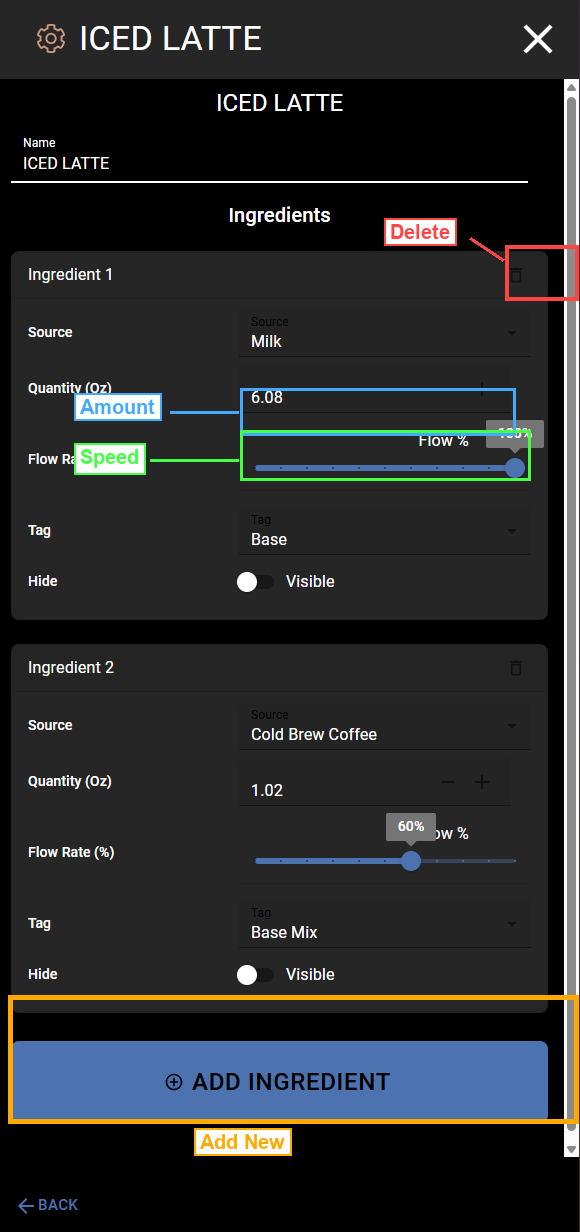
Step 2: Find the Ingredient You Want to Remove
Each ingredient has a card with its name, amount, and settings. Look for the ingredient you want to remove.
Step 3: Tap the Trash Icon
In the top-right corner of each ingredient card, there is a trash icon (marked in red in the screenshot above). Tap it to remove that ingredient from the recipe.
Warning: The ingredient is removed right away. There is no “Are you sure?” prompt. If you remove an ingredient by mistake, you will need to add it back manually. See Add an Ingredient.
Step 4: Check the Remaining Ingredients
After you remove an ingredient, the drink will pour less liquid than before. You may want to increase the amounts of the remaining ingredients to make up for it.
Example: If you remove an ingredient that was 1 oz, you might want to add that 1 oz to another ingredient so the drink stays the same total size.
See Change Ingredient Amounts for how to adjust the amounts.
When You Are Done
Tap the X in the top-right corner to close the recipe editor. Your changes are saved.